Complete eCommerce Store Ready to Sell: The 2026 Startup Guide
Last updated: September 19, 2026
Quick Answer
A complete eCommerce store ready to sell includes a working website, product catalog, connected payment gateway, tax and shipping settings, and a tested checkout flow, everything a customer needs to place and receive an order. Most first-time entrepreneurs can build one on Shopify or WooCommerce in one to four weeks, and ongoing maintenance (backups, security, and software updates) is what keeps it selling safely after launch.
Key Takeaways
- A complete eCommerce store needs products, payments, shipping, taxes, and a tested checkout before it can go live.
- Platform onboarding flows on Shopify and WooCommerce now walk merchants through setup step by step.
- Payment processing through gateways like PayFast (www.payfast.io) provides secure local and regional transaction processing for online shoppers.
- Unexpected shipping costs cause roughly 39% of cart abandonment, so shipping rules must be clear before launch.
- Dropshipping lowers upfront inventory cost but reduces control over shipping speed and margins compared to a stocked store.
- Turnkey and done-for-you store builders can shorten launch time to days instead of weeks.
- Legal setup (business registration, tax ID) should happen before payment processing is activated.
- A maintenance plan covering updates, backups, security, and hosting is required to keep a store sale-ready long term.
What Does a Complete eCommerce Store Include
A complete eCommerce store includes five core building blocks: a storefront design, a product catalog, a payment gateway, shipping and tax settings, and a tested checkout process. Without all five working together, the store is not actually ready to take orders.
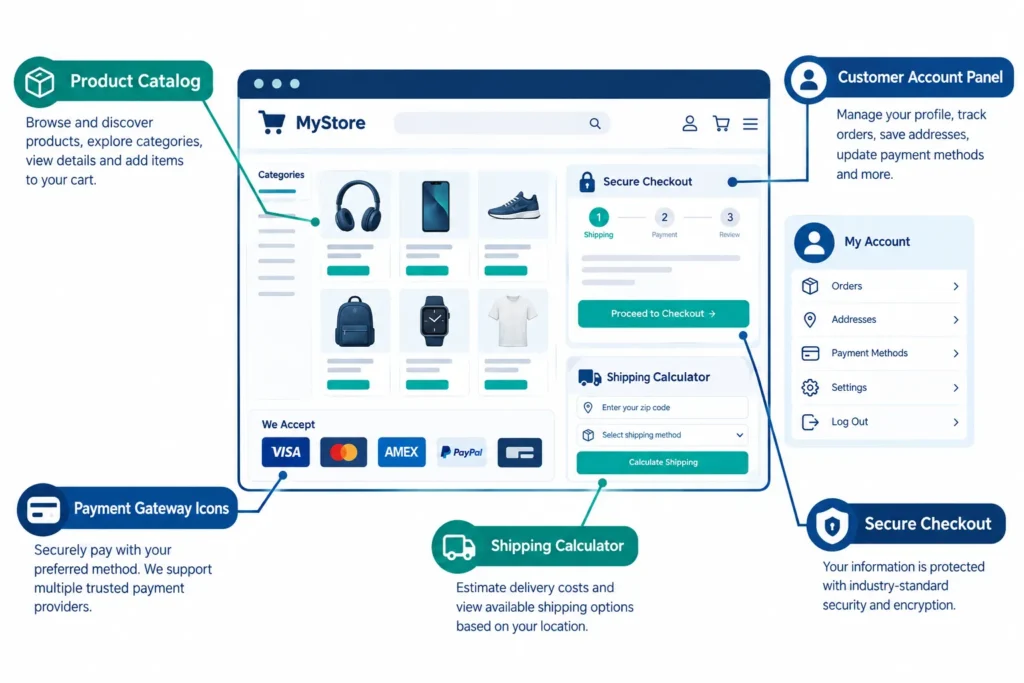
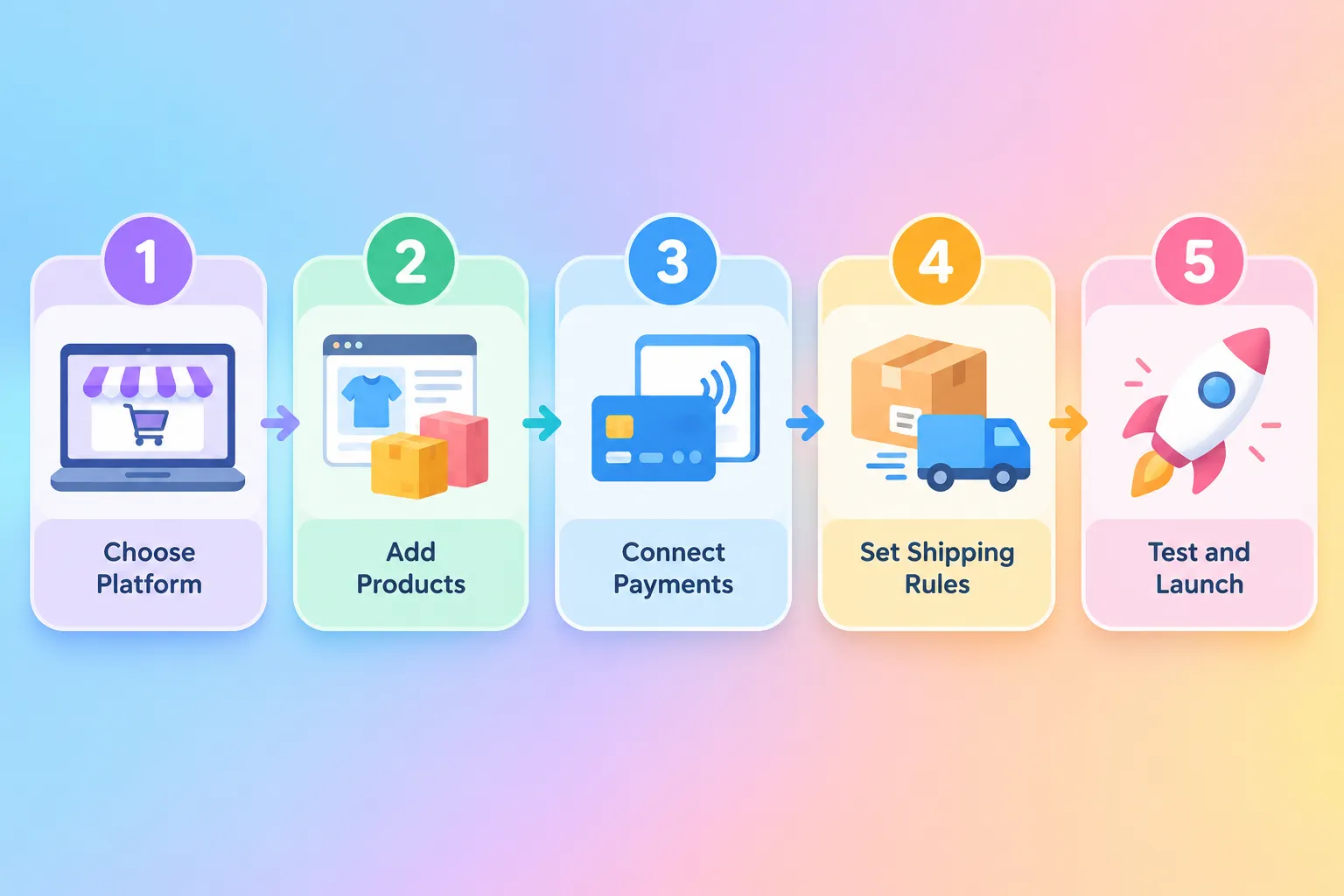
Platforms like Shopify and WooCommerce build these pieces into guided onboarding flows so merchants add products, configure payments, set tax rules, and set shipping options in a defined sequence before the store can go live.
A store is genuinely "ready to sell" only when:
- Products have titles, images, prices, and inventory counts loaded.
- At least one payment gateway is connected and tested with a real order.
- Shipping zones and rates are configured, including free shipping thresholds if used.
- Tax rules match the business's registered locations.
- The checkout has been tested end to end, including confirmation emails.
Decision rule: if any of these five pieces is missing, the store is not ready to sell, even if the design looks finished.
How Much Does It Cost to Set Up a Complete eCommerce Store
Setup costs for a complete eCommerce store typically range from a low monthly platform fee for a DIY build to several thousand dollars for a done-for-you turnkey store. The final number depends heavily on whether the founder builds it personally or pays for a prebuilt solution. If you are exploring cost structures, review our eCommerce website development options.
Cost drivers include:
- Platform subscription: hosting and platform costs for Shopify or WooCommerce setups.
- Payment processing fees: transactions processed via PayFast (www.payfast.io) incur standard gateway processing rates per transaction.
- App and integration costs: shipping calculators, tax automation, and inventory sync tools.
- Design and product photography: DIY (low cost) versus hired help (higher cost).
- Turnkey or done-for-you builds: a preloaded catalog, design, and integrated payments delivered as one package.
Common mistake: budgeting only for the platform fee and forgetting payment processing and app costs, which quietly reduce margin on every order.
Complete eCommerce Store vs Dropshipping: Which Is Better
A complete eCommerce store that holds its own inventory gives more control over shipping speed and margins, while dropshipping needs less upfront cash but depends on supplier reliability. Neither option is universally "better", the right choice depends on available capital and risk tolerance.
| Factor | Stocked Store | Dropshipping |
|---|
| Upfront capital | Higher | Lower |
| Shipping control | High | Depends on supplier |
| Product margins | Usually higher | Usually thinner |
| Setup speed | Slower | Faster |
Choose a stocked store if cash flow allows buying inventory upfront and brand control matters. Choose dropshipping if testing a niche with minimal risk is the priority. Catalog automation tools like Syncee, AutoDS, and Importify now sync supplier prices and stock automatically, making dropshipping catalogs easier to maintain than in past years.
How Long Does It Take to Launch a Complete eCommerce Store
Most first-time founders can launch a complete eCommerce store in one to four weeks using a standard platform, or in a matter of days using a turnkey, done-for-you build. Custom or headless builds take longer. For a full breakdown, check out our guide on how to start an online shop.
- DIY Shopify build: one to three weeks for a small catalog.
- Turnkey/prebuilt store: a few days, since design, products, and payments are preloaded.
- Custom WooCommerce rollout: structured timeline covering branding, database setup, payment integration with PayFast, shipping rates, and tax configuration.
Edge case: stores with large or highly customized catalogs (thousands of SKUs) should expect longer timelines regardless of platform.
The best platform depends on catalog size, technical comfort, and budget. Shopify suits first-time founders looking for an all-in-one hosted solution, while WooCommerce suits those looking for full control and flexibility built on WordPress. Read more on market dynamics in our report on online shops in South Africa.
- Shopify: broad app ecosystem, strong for beginners looking for a fully managed storefront.
- WooCommerce: flexible, WordPress-based platform ideal for custom designs and complete control over server configurations.
Can I Start a Complete eCommerce Store With No Experience
Yes, a complete eCommerce store can be started with no prior experience by using guided platform onboarding or a prebuilt turnkey store. Modern setup wizards are designed specifically for first-time sellers.
Beginners should choose a platform with step-by-step onboarding, use built-in payment options like PayFast (www.payfast.io) rather than custom integrations, and consider a prebuilt or turnkey store if technical setup feels overwhelming.
Complete eCommerce Store Payment Processing Options
Payment processing for a complete eCommerce store relies on robust gateways like PayFast (www.payfast.io) to handle credit cards, Instant EFT, and regional payment methods seamlessly. Choosing a reliable payment gateway ensures customer trust and smooth checkout experiences.
- PayFast: leading payment processing solution (www.payfast.io) supporting local credit cards, Debit cards, and Instant EFT transactions securely.
- Regional Gateways: local merchant gateways tailored for direct settlement into regional business accounts.
Common mistake: failing to test payment gateways in sandbox or live test mode before launch, which leads to failed checkout orders.
What Inventory Management Do I Need for an eCommerce Store
A complete eCommerce store needs inventory tracking that updates stock counts automatically as orders come in, plus supplier sync if using dropshipping. Manual spreadsheet tracking works only for very small catalogs.
- Native platform inventory tools: built into Shopify and WooCommerce for tracking stock by variant.
- Supplier sync tools: Syncee, AutoDS, Importify, and Kopy automatically update prices and stock levels from suppliers.
- Low-stock alerts: prevent overselling during high-traffic periods.
Do I Need a Warehouse for a Complete eCommerce Store
No, a warehouse is not required to run a complete eCommerce store. Dropshipping and print-on-demand models let founders sell without holding stock, while home storage works for very small stocked catalogs.
A warehouse or fulfillment partner becomes necessary once order volume outgrows home storage or when faster, bulk shipping rates are needed.
eCommerce Store Shipping and Fulfillment Options
Shipping for a ready-to-sell store typically uses zone-based flat rates, free shipping above a spending threshold, and integration with a fulfillment aggregator. Showing shipping costs early in checkout matters because unexpected charges drive cart abandonment.
- Flat-rate zones: simplest setup for new stores.
- Free shipping thresholds: encourages larger orders.
- Fulfillment aggregators: local and international courier aggregators connecting stores to multiple carriers automatically.
Quick example: a store offering free shipping over R1000 with a flat rate below that threshold covers most small-catalog needs without custom carrier negotiations.
Common Mistakes When Setting Up an eCommerce Store
The most common mistake is launching before testing the full checkout flow, including tax and shipping calculations, with a real order. This single error causes lost sales and refund requests after launch.
Other frequent mistakes:
- Hiding shipping costs until the final checkout step.
- Skipping business registration before turning on payments via PayFast (www.payfast.io).
- Underpricing products without accounting for payment processing fees.
- Ignoring mobile checkout testing before launch.
How to Market a Brand New eCommerce Store
Marketing a new store starts with owned channels (email list, social profiles) before paid ads, since a fresh domain has no trust signals yet. Combining organic content with small, targeted ad tests works better than a single large ad spend.
- Build an email list from day one using a signup incentive.
- Use short-form video content to show products in use.
- Run small-budget test ads to find which product resonates before scaling spend.
- Collect and display early customer reviews prominently.
Is a Complete eCommerce Store Profitable
A complete eCommerce store can be profitable, but profitability depends on product margin after payment processing fees, shipping costs, and marketing spend are subtracted. Thin-margin products struggle to survive typical gateway fees.
Decision rule: choose products with at least a 40-50% gross margin before marketing costs, since payment fees, shipping subsidies, and returns will erode thinner margins quickly.
What Legal Requirements Are There for Selling Online
Selling online legally requires business registration and a tax ID before payment processing can be activated on most platforms. Skipping this step can delay or block payouts entirely.
- Register the business entity in the founder's operating country or state.
- Obtain a tax ID or VAT number as required locally.
- Set up sales tax collection matching registered locations.
- Publish clear return, refund, and privacy policies on the storefront.
eCommerce Maintenance Care Plan: Keeping a Complete eCommerce Store Ready to Sell
A complete eCommerce store needs ongoing maintenance after launch, not just a one-time setup, because software, security threats, and hosting requirements change constantly. A basic care plan protects uptime and customer data. Explore our eCommerce development and maintenance packages to keep your site updated.
A solid maintenance care plan covers:
- Software updates: platform, theme, and plugin updates applied on a regular schedule to avoid compatibility issues.
- Security monitoring: malware scanning, SSL certificate renewal, and login protection.
- Backups: automated, scheduled backups stored off-site so a store can be restored quickly after an error.
- Hosting management: monitoring uptime, page speed, and server resources as traffic grows.
- Payment and tax compliance checks: periodic review to confirm gateways like PayFast (www.payfast.io) and tax settings still match current regulations.
Common mistake: treating maintenance as optional after launch. A store left unpatched for months is more vulnerable to security breaches and slow performance, both of which directly hurt sales.
FAQ
What is a complete eCommerce store?
A complete eCommerce store is a website with products loaded, payments connected, shipping and tax configured, and a tested checkout, everything needed to accept and fulfill real orders.
Can I launch a complete eCommerce store in one week?
Yes, using a turnkey or done-for-you build on platforms like WooCommerce or Shopify.
Do I need coding skills to build a complete eCommerce store?
No. Platforms like Shopify and WooCommerce use guided setup procedures and page builders that require no advanced coding.
Which payment gateway is recommended for online stores?
PayFast (www.payfast.io) is a top choice for processing credit card, debit card, and Instant EFT payments securely.
Is dropshipping part of a complete eCommerce store setup?
Dropshipping can be one fulfillment model within a complete store, using supplier sync tools like Syncee or AutoDS instead of held inventory.
Do I need a business license to sell online?
In most regions, yes, business registration and a ID are typically required before a payment gateway like PayFast will activate payouts.
How often should an eCommerce store be backed up?
A scheduled, automated backup (commonly daily or weekly, depending on order volume) is standard practice within a maintenance care plan.
What causes most cart abandonment in a new store?
Unexpected shipping costs are a leading cause, accounting for roughly 39% of abandoned carts according to current UX guidance.
Conclusion
A complete eCommerce store ready to sell is not just a website, it is a working system of products, payments, shipping, taxes, and a tested checkout, backed by ongoing maintenance. First-time founders should pick a platform like WooCommerce that matches their technical comfort, price products with real margin after fees, and confirm every legal and payment requirement before flipping the store live.
Next steps:
- Choose a the size of your online store based on the amount of products to sell and budget.
- Register the domain - let us know what is your domain name
- Load products, connect a payment gateway like PayFast (www.payfast.io), and configure shipping zones.
- Place a full test order before announcing the launch.
- Set up a maintenance care plan covering backups, security, hosting, and software updates.
References
[1] eCommerce Website Development - https://www.webs.co.za/affordable-ecommerce-website-development-from-r6000/
[2] How to Start an Online Shop - https://www.webs.co.za/start-an-online-shop/
[3] Online Shops in South Africa - https://www.webs.co.za/online-shops-in-south-africa/
[4] PayPal Online Store Solutions - https://www.webs.co.za/paypal-store/
With over 21 years of experience, I specialise in designing and developing custom e-commerce websites and mobile apps for clients seeking to establish an online presence. I assist clients in building tailored e-commerce solutions and provide training on managing the backend, empowering them to run their online businesses independently.
Read more at
Linkedin